Rockbox DAYLIGHT
A custom Rockbox UI for the Aigo Eros Q music player, made to read in direct sun.
Tested on device; rebase not yet flashed
Description
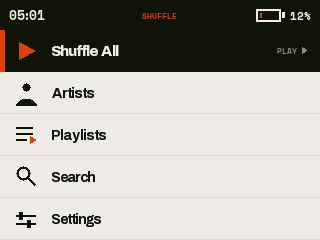
The stock Rockbox interface is dense and hard to read on a small screen outdoors. DAYLIGHT replaces it on the Eros Q with a paper-bright, high-contrast UI that reads at arm's length in direct sun and works entirely from the wheel and buttons. The main action is Shuffle All: one press plays everything on the card, with browse screens behind it. I built it for my own player.
Block diagram
- Wheel + 8 keys
- DAYLIGHT UI
- Rockbox core
- ES9018 DAC
Decisions
Draw Now Playing in C with the other screens
The design mockups the UI was built from specified Now Playing as a Rockbox WPS skin. Its no-art fallback, a large first-initial monogram on an ink tile, is beyond what stock WPS renders, and the other screens were already custom C, so Now Playing moved into C as well. One rendering path covers every screen. The cost is that there is no swappable theme, and simulator screendumps diffed against the design frames are the only fidelity test.
Re-implement keylock in the shared theme layer
The Eros Q has no hold switch, and stock Rockbox enforces keylock in the action layer that DAYLIGHT's raw button loops bypass, so button lock silently did nothing. Routing input back through the action layer would have brought back the stock key mapping the fork removed. One keylock filter now runs first in every input loop, and a short Power press toggles it. Any new input loop has to call the filter or it will ignore the lock.
Return the music database build to stock behaviour
Hardware testing went from a silent boot-time scan, which froze the player on a large card, to a blocking loading screen, which invited reboots mid-build. I sent the fork back to Rockbox's own background build. Home is usable at once, Shuffle All walks the filesystem without the database, and Artists and Search show a building message until the index is ready. The blocking screen stays compiled as a one-line revert, because this area changed direction twice on device feedback.
Errata
- The rebase onto current upstream Rockbox builds clean but has not been flashed or tested on the player; the on-device smoke test is still open.
- The flat all-songs list stops at a fixed window size. Large libraries need on-demand paging, which is deferred.
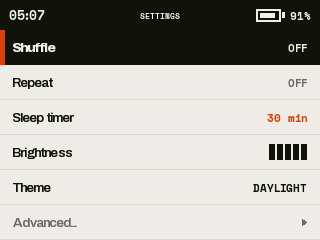
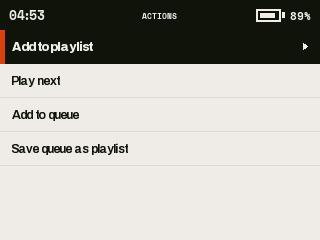
Rockbox is free software under the GNU GPL, version 2 or later. The screens above are simulator screendumps at the player's native resolution.